






#1 choice for media pre-production.
Celtx is the world's first all-in-one media pre-production system. It replaces 'paper & binder' pre-production with a digital approach that's more complete, simpler to work with, and easier to share. Sale - Celtx Plus - $9.99 - 33% off.
Writing Tools
Scripts
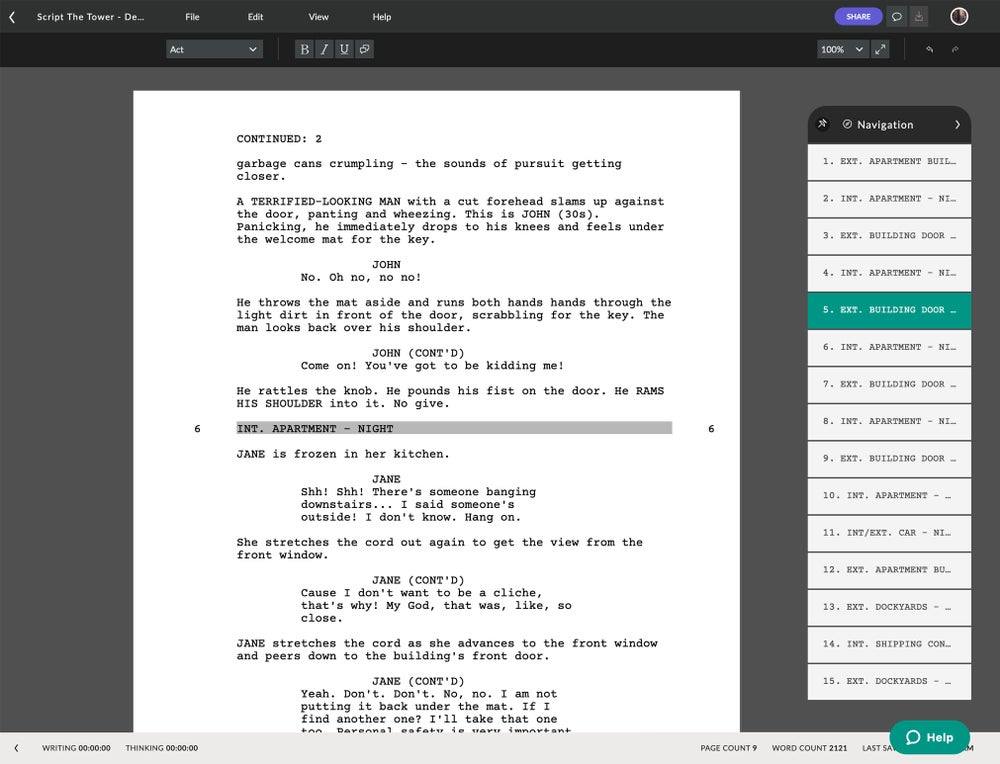
Celtx includes five dedicated industry standard editors for writing:
- Screenplay
- Stageplay - International and US standard
- AV scripts - including documentaries, music videos and advertising.
- Audio Play - including radio plays and podcasts.
- Comic Book
- Novel
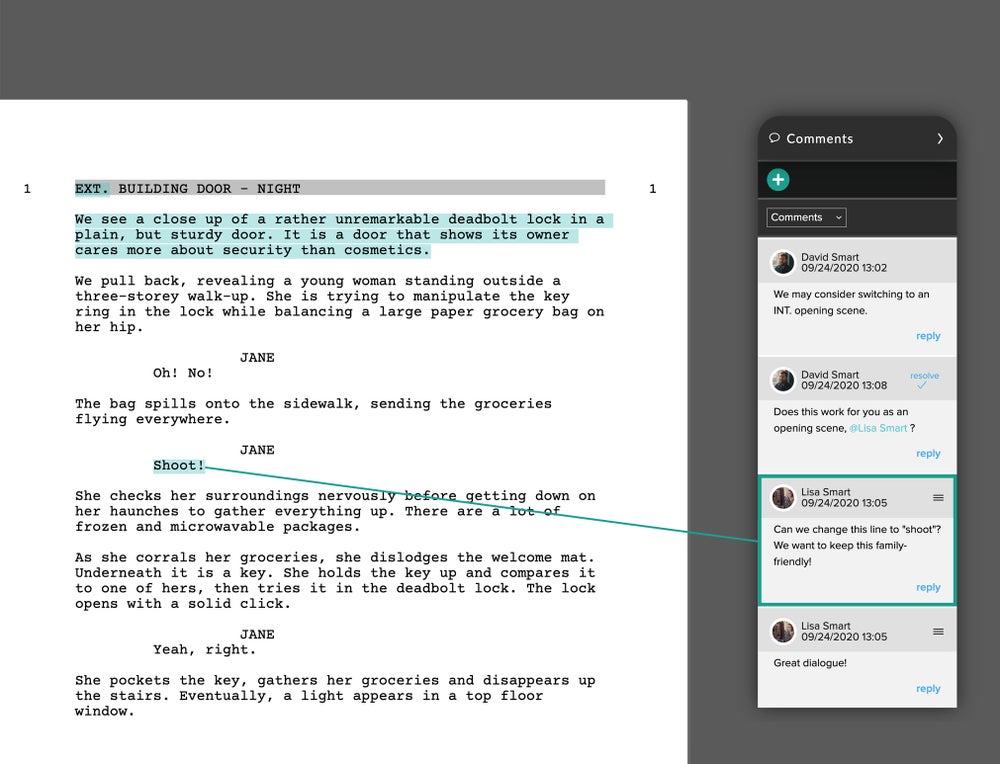
Celtx includes the essential features that writers need to keep their fingers moving - like intuitive formatting, text auto-complete, page breaks, dual column dialog, scene management, scratchpad, embedded notes, title page generation, pagination, printing, spellchecker, keyboard shortcuts, find and replace, script importing and exporting, PDF and HTML script reports, and collaboration.
Text Lock
The Text Lock feature enables a writer to lock a script from further text editing, while still allowing others with whom they share the project to continue working. This can be used to protect a script while it is being marked up and broken down for production. The script can be locked and unlocked as many times as needed.
Revision Mode
Revision mode provides writers with the ability to lock scenes when editing a script that is in production. The feature supports the Hollywood standard A and B scene nesting, an innovative numeric mode, plus the ability to create your own unique nesting style template. A 'Fix' feature can be used to manually change any scene nesting. Revision mode also enables edits to be colour coded to help keep track of changes made between revisions or by different writers.
Adapt To
With a single click Adapt To converts any fully formatted script of one type into a fully formatted script of another - for example, a Stageplay to a Screenplay - displaying in an instant the multi-media potential of your work.
TypeSet/PDF
TypeSet/PDF provides precise automatic formatting of your script to industry and international standards. The Celtx server uses the very powerful LaTex typesetting tool to deliver perfectly formatted scripts, which can be saved within the feature in PDF format. Full support is provided for optional formatting features like Mores and Continueds, scene numbering, dialog numbering and paper size.
Index Cards
Celtx includes reversible, colour coded Index Cards that are intelligently tied to your script and auto populate with the Scene Headers and first 40 words or so of the scene. You can flip the cards to type notes on the back, colour code them to track plot lines, and drag and drop them to reorder scenes.
Story Development Forms
Celtx helps you develop your story with preloaded forms for key elements like locations, scenes, props, characters, and 32 other production categories. You can use the forms to organize your thoughts and kick-start a media rich storyline that includes sound files, images and video clips. Celtx story development forms are intelligently tied into your script, informing the story and each scene with valuable production information.
Template Engine
If the default setting for a Celtx project doesn't fit your needs, you can create your own new, blank state Template that will only open the documents you want.
Pre-Visualization Tools
Storyboarding
Take your media project to the next level by adding a storyboard based on your script and adding individual or batch images in to the storyboard. Each storyboard image is accompanied with a shot description to help you communicate your creative vision. Rearrange images and sequences within the project to construct your visual narrative. Then when you're ready, use the slideshow feature to play the images to help pre-visualize your media project.
Sketch Tool
The Sketch tool can be used to add overhead camera and lighting setups to your projects. The Sketch tool includes pre-loaded icons for camera, lights and people that can be tagged with text, and tools for drawing lines, arrows, shapes and adding text. Plus, professional art packs of additional images (eg. girl, boy, crowd, car, furniture/fixtures, etc.) can be purchased from the Celtx web site.
Media Rich Breakdowns
You can add sound files, video clips, digital photos and scanned documents to your project to create a media intensive breakdown. You can then associate the media with any one of the 36 production categories, including wardrobe, props, and locations.
Productivity Tools
Catalogs
Catalogs provide a way for you to organize and view the many production items and research details required in the pre-production stage of any media project. Each Celtx project includes a Master Catalog which auto-populates as you breakdown your script, ultimately providing a searchable dashboard view of all your story's elements and production items. Additional Sub-Catalogs can be created for specific production categories - like props, characters, and wardrobe.
External Documents
You can add any document from any application to your project - PDFs, budget spreadsheets, images, and scripts written in other applications - to help stay organized.
Scheduling, Call Sheets and Shooting Reports
Celtx includes a 'Just In Time' Scheduling feature that lets you manage your projects in real time. Open a schedule based on your script and drag and drop scenes to the calendar to build your shooting schedule. Generate customizable Shooting Reports to keep track of the resources you'll need during shooting, including lists of props, actors, and wardrobe items. Create Call Sheets to ensure your crew knows where and when to show up for the shoot.
Inter-Project Document Management
You can also drag and drop documents between projects. Grab a document from one Project Library and drop it in to another Project Library and you're done.
Add-Ons
You can customize Celtx with add-on tools. Customization helps you increase productivity and be more creative.
Online Tools
Celtx Studios
Celtx Studios offer a feature-rich toolset to simplify and improve the collaboration and workflow process.
- Share projects quickly and easily.
- Store every project, every version, and every file.
- Manage team workflow.
- Sync scripts with your iPad/iPhone.
- Access projects from any computer.
- Privately preview projects on the web.
- Chat online with other Studio members.
- Personalize your studio with logos and backgrounds.
Celtx Studios are priced to be affordable for everyone - including individuals, production teams, schools, and non-profits.
Celtx Forums
You can publish your work-in-progress or completed scripts for public viewing and peer reviews at the Script Reviews & Collaborations section of the Celtx Forums.
Celtx 2.9.1 - April 14, 2011 Source code
Bug Fixes
Bug fixes and optimizations.
New Features - 2.9
Novel Editor
- Integrated with Index Cards (by chapter) and intelligently tied in to notes, media, breakdown, and story development forms.
- Text/HTML import and export.
- Data created in a novel project - e.g. character profiles and location descriptions - can be used in a subsequent reworking of the novel to film, stage, comic book, audio play or A/V.
Coloured Notes
Colour code your script and novel notes.
Catalog CSV Export
Export Project Library catalog data as a .csv file.
Dialog Numbering
Add a numerical value to each dialog element in your film script.
Hide Breakdown Colours
Hide the coloured markup in your script.
Sketch
The Sketch tool now supports 360 degree rotation of squares/rectangles and ovals. You can also now export sketches as .png image files.
Celtx Store
A new Celtx Store tab has been added to the right hand sidebar to display apps and add-ons that improve your Celtx setup.
22 Bug Fixes and Improvements
Media in Editor
Adding breakdown to a script no longer causes notes or media icons to disappear from the editor.
Script Sync from iPad/iPhone
Scripts synced from the iPhone/iPad and then copied are now stored in memory.
Index Card 'Notes' Text Save
Text added to index cards 'notes' is now saved when project is closed and reopened.
External File Edits
Edits made to attached external files are now saved.
Font Carry Over
Text copied from a text document to a script no longer results in the font choice being carried over as well.
Negative Numbers
'Comments' in Celtx Studios no longer displays negative numbers when comments are disabled.
Autosave Cursor Jump
The cursor will no longer jump to the top of a text document on the initial instance of Autosave.
Font Reversion
When selecting bullets in the text (novel) editor, the font will not revert back to the default font (Times).
Margins
Consistent top, bottom and side margins will now display on text (novel) document print outputs.
Notes Remaining in Sidebar
Notes will no longer remain in the sidebar after a script is deleted.
Undo 'Select All->Cut'
'Select all' then 'Edit->Cut' can now be undone using the Undo button.
Comic Book HTML Export
Page Element and Page Number (eg, Page 1) are now included in the HTML export of a comic book script.
Notes Dragged to New Scene
Notes dragged from scene A to scene B will now properly associate with scene B in the sidebar.
Inline Spell-checking
Inline spell-checking will now permanently 'add [a word] to dictionary' (using right-click).
.html Appends to .txt (Mac)
Script files exported in .html extension appended to .txt extension when exporting script files (MAC only).
Sidebar Display Issues
Fixed various notes/media/breakdown sidebar display issues (not scrolling to selected note or media item, no tif thumbnail, display issue editing text, breakdown item not always highlighted when selected in script, note out of bounds).
Open from Studio
Projects opened from the Studio will now open in the same tab state as the previous session.
Spell-check Close
The 'Esc' key will now close the Spell-check dialog.
'Save to Studio' Dialog
'Studio: Personal' has been removed from the 'Save to Studio' dialog.
Sample Projects
Fixed typos and UI issues in sample projects.
Improved UI
Improved the UI for story development forms, notes, and Notes/Media/Breakdown Sidebar.
Novel Sample Project
Added 'Alice's Adventures In Wonderland' sample Novel project.
Since Celtx is free to use, it's not surprising that we get a lot of emails from people like you asking "How can I donate to Celtx development?". Well, while we really appreciate the offer, we'd prefer you put your donation to where it can make the greatest difference - helping to save a life.
We've joined the fight against malaria and we'd like you to as well. Simply donate $5 and buy a life-saving malaria bednet.
To donate visit: www.againstmalaria.com/CeltxNets. 100% of your donation will be used to buy insecticidal malaria bednets.

Windows
OS X (10.5+)
Linux 32bit